
Have you ever been working in Windows Vista when suddenly your system comes to a screeching halt and the rotating "wait" icon begins poping in and out? That's an indication that something is happening in the background, and frequently that something is Windows Media Player Network Sharing Service (wmpnetwk.exe).
This service allows Media Player to share media with other computers on the network. Even if Windows Media Player isn't open on your computer, it could be running in the background. I can't count how many times Windows Media Player has started running in the background on my computer on its own volition.
If this has happened to you, follow ths steps below to disable Windows Media Player Network sharing Service.
1. Open Control Panel and in Control Panel's left pane, click on Classic View.
2. In Control Panel's right pane, double-click on Administrative Tools.
3. In Administrative Tools double-click on the Services icon.
4. If the user Account Control dialog box appears, click on the [Continue] button.
5. In the Services window that appears, locate "Windows Media Player Network sharing Service" and double-click on it.
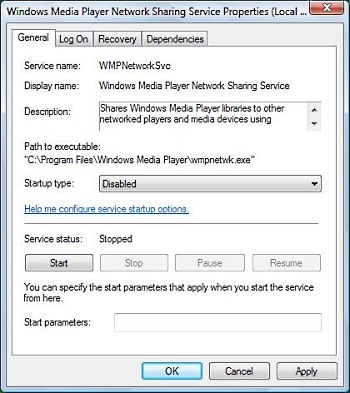
6. In the Windows Media Player Network sharing Service Properties dialog box, in the Startup type: drop-down-list, select Disabled.
7. Click on the [Apply] button, then on the [OK] button.
Now if you go back to the Services window, the value next to Windows Media Player Network Sharing Service in the Startup Type column should be Disabled.

More Windows Tips:
• Use Windows Key Shortcuts
• How to Remove Metadata From Files in Windows 7
• Disable Taskbar Button Grouping
• Windows 7 - Five Ways to Move or Copy Files or Folders
• Make PDF eBooks Read Themselves Outloud
• Where Did Firefox Put My Download?
• Introducing Screensavers
• How to Configure Windows 7 Autoplay
• Create a Shortcut to Task Manager
• How to Create a Microsoft Excel Database